The SDR Lead Machine
It started with a simple problem to solve: SDRs were spending too much time finding companies, identifying contacts, crafting messages, and following up manually.
The real problem wasn't the sales work itself. It was everything that comes before it: the preparation.
The Real Problem
An SDR spends a large chunk of their time on tasks that have nothing to do with selling:
- finding relevant companies;
- identifying the right contacts;
- understanding their technical context;
- writing a message that doesn't feel like a generic template;
- following up without losing track;
- tracking results.
Each step is time-consuming. Each step is repetitive. And each step, taken on its own, is "doable manually," which is exactly why organizations are often slow to automate them.
The actual goal
The goal was not to automate prospecting end-to-end, but to prepare cleaner, faster, and more contextualized sales work. SDRs stay in control of sending, follow-up, and sales decisions.
What I Wanted to Build
Not a CRM. Not an "AI SDR platform." Not a tool that claims to do everything.
I wanted a prospecting assistance machine: semi-automated, with human control where it matters.
Concretely:
Each step had to be understandable, modifiable, and observable.
High-Level Architecture
flowchart LR
    A[Domain sources\nPublic API · Tranco · Others]
    --> B[Website list\n+50,000 French companies]

    B --> C[Scrapy crawler\nCompetitor tech detection]

    C --> D[~10,000 companies\nwith relevant tech]

    D --> E[Hunter.io enrichment\nCompany + contacts]

    E --> F[Enriched DB\nn8n environment]

    F --> G[Competitor pain point matching]
    F --> H[Customer reference matching]

    G --> I[Scoring]
    H --> I

    I --> J[SDR assignment\nbalanced distribution · 40/week]

    J --> K[Message generation\nOpenRouter + GPT-4o-mini]

    K --> L[Microsoft Lists\noperational tracking]

    L --> M[Power Automate\nstatuses + follow-ups]
    L --> N[Teams\nweekly notification]
    L --> O[Power BI\nreporting]
The Starting Data
Before detecting anything, you need a list of sites to analyze.
I built a base from several sources:
| Source | Type |
|---|---|
| Public API | Enriched company data |
| Tranco | Domain popularity ranking |
| Other lists | Sector-specific compilations |
Result: more than 50,000 French company websites to crawl.
It's not a perfect base. Many sites are inactive, poorly indexed, or off-target. That's expected and anticipated: quality comes later, not upfront.
The Scrapy Crawler: Detecting Competitor Technologies
I built this crawler as part of a dedicated project, and I cover it in more detail in this article on building a web technology detector with Scrapy.
A Scrapy spider visits each URL and looks for technology fingerprints in the HTML, scripts, cookies, headers, and meta tags.
The technologies targeted belong to the emailing, CRM, marketing automation, and events ecosystem:
| Tech | Category | |
|---|---|---|
 |
Mailchimp | Emailing |
 |
HubSpot | CRM / inbound |
 |
Klaviyo | E-commerce emailing |
 |
Brevo | Emailing / CRM |
 |
Salesforce | Enterprise CRM |
 |
ActiveCampaign | Marketing automation |
 |
Mailjet | Transactional emailing |
 |
Dialog Insight | Quebec emailing |
 |
Sarbacane | French emailing |
 |
Splio | French marketing automation |
 |
Actito | Marketing automation |
 |
Marketo | Enterprise marketing automation |
 |
Weezevent | Ticketing / events |
 |
Mapado | Cultural ticketing |
 |
Eudonet | Association CRM |
Out of roughly 50,000 sites analyzed, about 10,000 companies were detected with a relevant technology.
Detection is not magic
Signatures can be fragile. A shared script can produce false positives. Some sites load their tools indirectly or dynamically. Detection gives a probability, not a certainty, which is exactly why scoring matters afterward. → How detection works in detail
Hunter.io Enrichment
Once companies are identified as relevant, the workflow calls the Hunter.io API to:
- enrich company data (industry, size, country, description);
- retrieve relevant sales contacts linked to the domain;
- associate contacts with the right companies.
The goal is not to collect "as many contacts as possible." A bad contact pollutes the workflow and wastes the SDR's time.
Limitations to anticipate
- Missing data for some domains;
- Emails not found or unverified;
- 404 errors if the domain is not indexed by Hunter.io;
- These cases need to be handled cleanly in the workflow so a single error doesn't block the entire pipeline.
Business Bases: Pain Points and Customer References
This is probably the least "technical" part of the project, but one of the most useful.
For each detected competitor technology, I built a structured base of potential pain points:
- insufficient deliverability;
- support that's hard to reach;
- high cost relative to volume processed;
- limited segmentation;
- lack of onboarding support;
- complex or missing integrations;
- poor UX;
- weak automation capabilities;
- limited reporting.
When the workflow detects that a company uses a specific competitor, it automatically retrieves the associated pain points and injects them into the message generation context.
I also built a base of our customer references, including:
- industry;
- project context;
- technology replaced or complemented;
- problem solved.
Goal: every message can mention a contextualized proof point, not just "we have clients in this sector."
The idea is not to brag. It's to give SDRs a credible, relevant argument for the person they're talking to.
Scoring
The workflow scores each company against several criteria before submitting it to the SDRs.
| Criterion | Indicative weight |
|---|---|
| 11-50 employees | +1 |
| 51-200 employees | +3 |
| 201-500 employees | +3 |
| 501-1,000 employees | +3 |
| 1,001-5,000 employees | +2 |
| 5,001-10,000 employees | +2 |
| 10,001+ employees | +1 |
| Type: partnership | +2 |
| Type: public company | +3 |
| Type: association / non-profit | +2 |
| Type: government body | +3 |
| Few or no contacts found | negative score |
| Multiple relevant contacts | positive score |
| Priority competitor technology | higher score |
An important lesson
When everything looks interesting, nothing is. Scoring's main purpose is to force prioritization.
The score is not an absolute truth. It's a sorting tool. It can evolve, be adjusted, and be overridden by the SDR. But without it, the workflow would send everything without hierarchy, and SDRs would drown.
The n8n Workflow: The Heart of the System
The n8n workflow orchestrates every step after enrichment.

The main steps:
- Retrieve enriched companies from the database;
- Sort by descending score;
- Cap at 40 companies per week (a deliberate guardrail);
- Check guardrails (duplicates, already-processed companies);
- Auto-assign to 3 SDR salespeople with balanced distribution;
- Retrieve associated contacts;
- Add sales fields (pain points, references);
- Match pain points based on detected technology;
- Match customer references based on industry;
- Generate the prospecting message (Message 1);
- Generate the follow-up message;
- Create rows in Microsoft Lists;
- Calculate batch statistics;
- Send a Teams notification to salespeople.
Why 40 companies per week?
This is not a technical limit. It's a deliberate choice. Too large a volume degrades follow-up quality, exceeds SDRs' actual processing capacity, and ends up being ignored. 40 well-prepared companies per week are worth more than 200 poorly tracked ones.
AI Generation: OpenRouter + GPT-4o-mini
For each company, the pipeline generates two personalized messages.
flowchart LR
    A[Enriched company]
    --> B[Detected technology]

    B --> C[Associated pain points]
    B --> D[Relevant customer reference]

    C --> E[Structured prompt]
    D --> E

    E --> F[GPT-4o-mini via OpenRouter]

    F --> G[Message 1\nprospecting]
    F --> H[Follow-up message]
The model receives a structured prompt containing:
- the company name and domain;
- the detected technology and its pain points;
- the selected customer reference;
- tone and format constraints.
AI is useful, but it's not the heart of the system. The heart is the assembly of data, business rules, scoring, and operational workflow.
GPT-4o-mini only handles phrasing and contextualization. It does not decide who to contact, when, or with which argument: that logic is structured in the workflow.
Microsoft Lists: The SDR Operational Interface
The final output lands in a Microsoft List shared with the salespeople.
Each row corresponds to a company, with its contacts, prepared messages, and statuses.
| Status | Meaning |
|---|---|
nouveau |
Lead created, not yet handled |
en_cours |
Salesperson has taken ownership |
clos |
Processing complete (regardless of outcome) |
| Status | Meaning |
|---|---|
envoye |
Message sent |
non_repondu |
No reply after 5 days |
repondu |
Reply received |
erreur |
Sending error |
| Status | Meaning |
|---|---|
rdv |
Meeting booked |
refus |
Explicit refusal |
hors_cible |
Lead not relevant |
Why Microsoft Lists?
Microsoft Lists is not the most glamorous tool in the world, but for this specific use case it did exactly what I needed: a simple, filterable, shareable interface connected to Power Automate. No need to build an internal tool, no need to train the team on a new product. The SDRs were already working in the Microsoft ecosystem.
Teams Notification and Adoption
Each new SDR batch triggers a Teams message sent automatically to the salespeople.
That message contains:
- the number of leads created and assigned;
- the breakdown by salesperson;
- status management guidelines;
- follow-up rules;
- a direct link to the Microsoft Lists list;
- a link to the n8n workflow for debugging if needed.
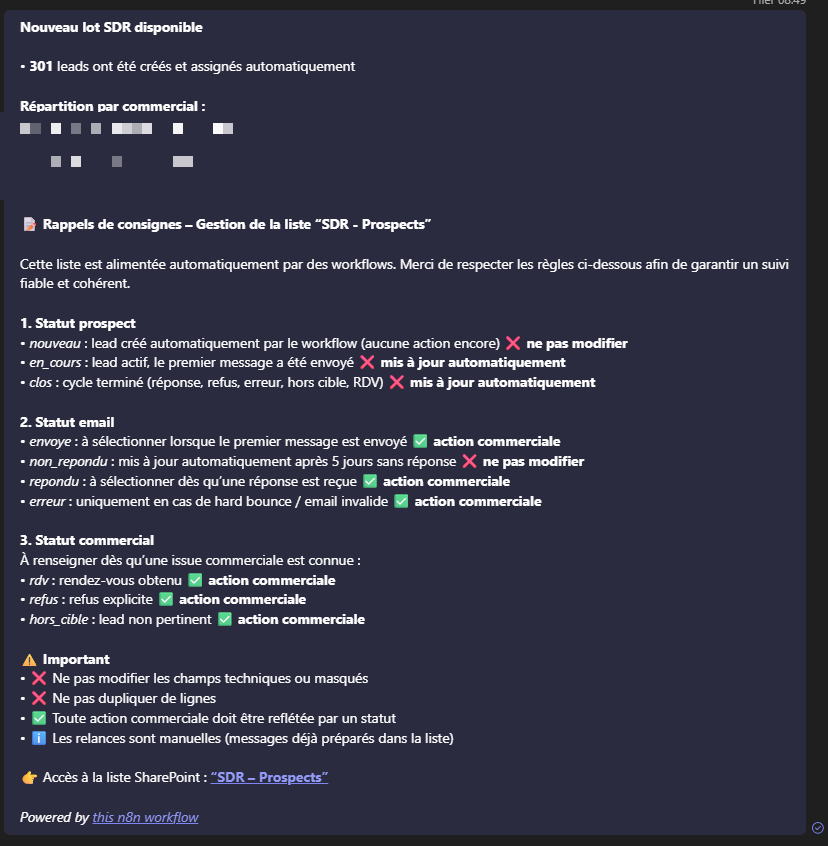
This part is often underestimated. A technical workflow is worthless if users don't understand how to use it, when it ran, or what to do next.
Operational documentation is not a luxury. It's the difference between a tool that gets used and one that gets abandoned.
Power Automate: Automatic Status Tracking
Once leads are in Microsoft Lists, Power Automate flows handle automatic tracking.
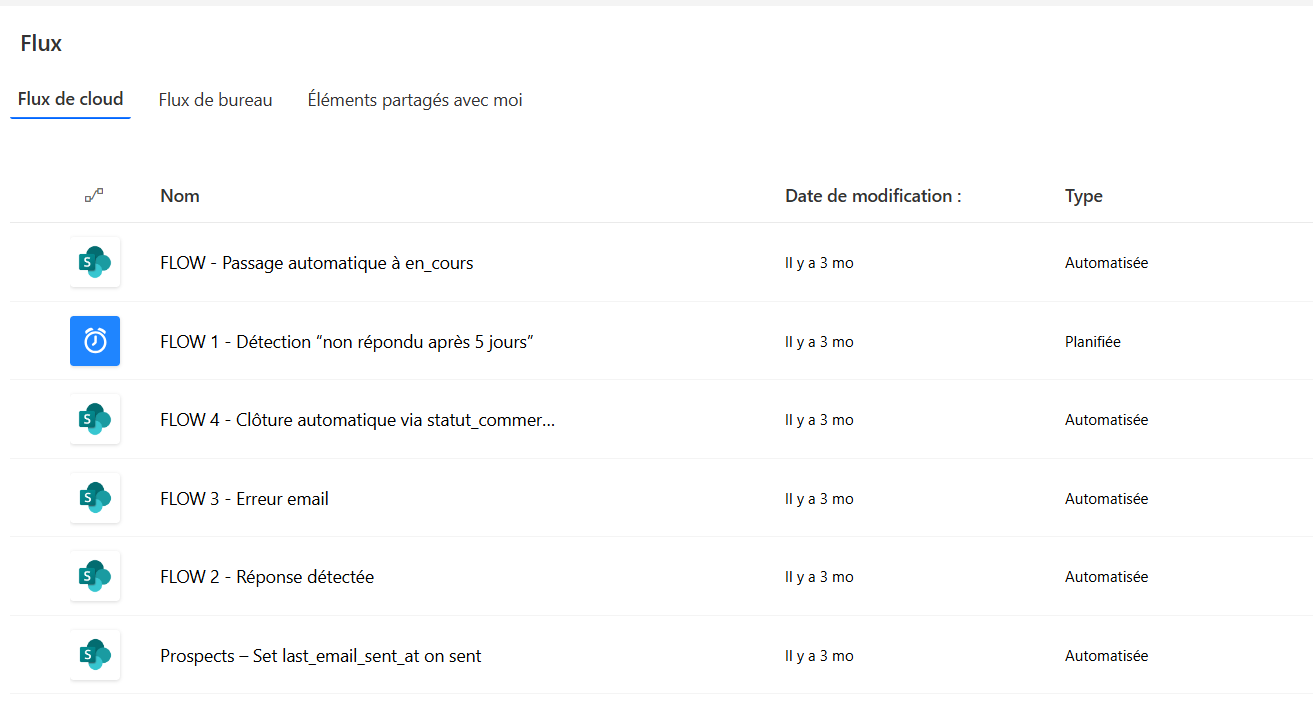
Power Automate complements n8n for everything touching the Microsoft environment: where n8n orchestrates generation and lead creation, Power Automate manages the operational life of each lead in Lists.
Power BI: Making the System Observable
The Power BI dashboard lets you track overall SDR performance.
A few figures from the dashboard covering the launch period:
| KPI | Value |
|---|---|
| Total leads | ~2,000 |
| Leads in progress | 270 |
| Closed leads | 62 |
| Refusals | 7 |
| Email errors | 26 |
| Off-target | 31 |
What it actually changes
Without reporting, the system remains a hack. With Power BI, it becomes manageable. You can identify what works, adjust scoring, change thresholds, and compare salespeople. The system moves from "experiment" to "management tool."
What Broke or Was More Complex Than Expected
Web data is messy. Many domains return errors, redirects, broken HTML, or empty sites. The starting base had highly variable quality and required cleaning steps that weren't planned upfront.
Hunter.io doesn't know every domain. For a portion of the detected companies, enrichment returns little or nothing. These cases had to be handled cleanly without crashing the whole workflow, and I had to decide what to do with those companies: keep them, discard them, or put them back in the queue.
The hardest part wasn't technical. It was aligning SDRs on statuses, management rules, and how to interpret automatically generated leads. An automated system that isn't adopted is worthless.
Scrapy signatures age. A competitor can change their CDN, rename their scripts, or load their tools differently. Detection is never "done."
What I Learned
On data
Always start from the worst case: missing data, API errors, invalid domains. A pipeline's robustness comes from its ability to handle edge cases without blocking everything.
On scoring
A good prioritization score beats a bad confidence score. Scoring is for deciding what to process first, not for predicting outcomes.
On AI
GPT-4o-mini offers an excellent cost-to-performance ratio for high-volume writing. For this type of task, personalizing messages from structured context, it does exactly what you ask without unnecessary overhead.
On workflows
A long and complex workflow is hard to maintain and debug. It's better to split early into clear sub-workflows, with readable logs and visible checkpoints.
On adoption
A technical tool without operational documentation always ends up being misused or abandoned. The Teams notification and clear guidelines were just as important as the code.
Current Limitations
What remains imperfect
- Scalability: the system runs on a controlled volume of 40 leads/week by choice. At larger scale, some components would need rethinking.
- API dependencies: Hunter.io, OpenRouter, n8n, each component can go down. More robust fallbacks would be needed.
- Variable quality: generated messages are good on average, but not always perfect. Human review is still necessary for some leads.
- Signature maintenance: Scrapy detection requires regular updates.
What I Would Do Differently
I would have normalized data earlier in the pipeline: casing, encodings, duplicate domains. It would have avoided corrections that had to be made after the fact.
Debugging in n8n is doable but not always pleasant on long workflows. I would have added structured logs and alerts earlier.
The main workflow became quite dense. Splitting it into sub-workflows from the start would have made it easier to evolve.
I handled Hunter.io errors as I went. It would have been better to define a clear strategy upfront: retry, queue, exclusion.
What I Would Explore Next
Potential directions
- Probabilistic scoring based on conversion history;
- Detection of stack changes over time (continuous monitoring);
- Clustering companies by tech profile and industry;
- Direct integration into a CRM to avoid the Microsoft Lists layer;
- Expansion to other countries with adapted signatures and domain sources.
I thought I was building a prospecting tool. What I actually built was an assembly system: data, rules, scoring, generation, and an operational interface.
Each individual component is simple. The assembly is where the value is created.
A readable, stable pipeline is usually worth more than an "intelligent" system that's impossible to maintain.