Building a Multi-Source Competitive Intelligence Pipeline with Trustpilot, LinkedIn, and the Web
Some projects start because you have a real problem to solve. Not an abstract idea. A concrete problem that comes back every week.
As part of Signar, I needed to answer a simple question: how do you help a sales team monitor its competitors without spending two hours manually searching LinkedIn, Trustpilot, and websites?
The obvious answer was "automate it." The real answer was more nuanced.
The difficulty isn't finding data. The difficulty is turning public noise into useful context.
That's what this project taught me, gradually, through iterations and mistakes.
The Starting Problem
Sales teams do competitive intelligence. Not always well, not always often, but they do it. They look at what competitors are up to, they read customer reviews, they follow LinkedIn announcements.
The problem: it's manual, sporadic, and hard to track.
When a competitor announces a new partnership, changes their messaging, goes on a hiring spree, or accumulates negative reviews about their support, that signal exists publicly. But you need to be in the right place at the right time to catch it. And even when you do catch it, you still have to decide whether it warrants action.
I looked at existing tools. There are plenty: Google Alerts, social listening tools, market intelligence platforms. The problem with most of them:
| Problem | Detail |
|---|---|
| Too generic | Not calibrated for B2B sales use |
| Not integrable | Closed, no clean API |
| Expensive at scale | Pricing that explodes once you monitor more than 20 companies |
| Too noisy | High volume, low signal |
| Not customizable | No way to add your own rules or context |
What I wanted was a pipeline I control entirely: the sources, the filtering rules, the output format, and above all, how AI fits into it.
Overall Architecture
The pipeline relies on three public sources, a cleaning layer, AI analysis, and structured storage in Supabase.
flowchart TD
    A[Competitor list\nSupabase] --> B[Normalization\ndomains / names]
    B --> C{Loop per company}

    C --> D[Trustpilot\ncustomer reviews]
    C --> E[LinkedIn\nposts / hiring]
    C --> F[Website / blog\npublic content]

    D --> G[Parsing\nper source]
    E --> G
    F --> G

    G --> H[Cleaning\nnormalization]
    H --> I[Assembly\nstructured context]
    I --> J[Client profile\nSignar context]
    J --> K[AI analysis\nOpenRouter]
    K --> L[Parsing\nJSON response]
    L --> M[Filtering\nrelevant signals]
    M --> N[Hash\ndeduplication]
    N --> O[(Supabase\nsignals)]
    O --> P[Prioritization\nurgency]
One important point before going further: n8n orchestrates, it doesn't process. As in my other projects, the business logic lives in the transformation nodes, HTTP calls, and the prompt, not in the workflow itself.
The Sources: What You Can Reasonably Expect
Before getting into the technical details, I need to be honest about what each source actually delivers.
What it is: real customer reviews, with a rating, free-form text, a date, and sometimes a company response.
What it reveals: concrete frustrations. Not the official pitch, what customers actually think about support, the product, onboarding, and pricing.
Why it's commercially useful: if a competitor has been accumulating support complaints for 3 months, and you offer exactly that level of service, you have an angle.
What it doesn't do: represent all customers. People who leave reviews are often at the extremes. You need to filter, cross-reference, and add nuance.
What it is: company posts, job listings, public announcements.
What it reveals: visible moves. New partnerships, mass hiring in a department, product launches, leadership changes.
Why it's useful: a competitor hiring 5 backend developers at the same time they announce a product overhaul is a signal of internal transformation.
What it doesn't do: produce actionable signals in bulk. The majority of posts are employer branding content or generic congratulations. The signal-to-noise ratio is the highest of the three sources.
What it is: a competitor's public pages, blog, product pages, resource pages, pricing pages.
What it reveals: the official messaging and how it evolves. A pricing repositioning, a new enterprise offer, a shift in the target audience in their sales copy.
Why it's useful: this is the most controlled source on the competitor's side. What gets published there is intentional. When the messaging changes, something is usually happening.
What it doesn't do: behave consistently. Every site has its own structure. Some have no blog, others publish without dates, others have everything in JavaScript.
Here's the honest picture:
| Source | Commercial value | Technical difficulty | Noise level |
|---|---|---|---|
| Trustpilot | Very high — direct customer pain points | Medium | Medium |
| Good — movement signals | High | Very high | |
| Website | Good — messaging and strategy | Medium | Medium |
Stack Used
n8n — orchestration
n8n was the natural choice for this type of workflow: scheduled triggering, loops over companies, HTTP calls to multiple sources, conditional branches, transformation nodes.
What I like about n8n for this kind of project:
- you can see the entire workflow at a glance;
- errors are logged per node;
- you can test one branch without rerunning the whole pipeline;
- iteration is fast.
What gets difficult as the workflow grows:
- branches become long and hard to read;
- JS expression nodes start to look like spaghetti code;
- debugging an error at node 47 of a 60-node workflow is not fun.
The main lesson: modularize early. Split each source into a sub-workflow called from a main workflow.
Supabase — signal storage
I use Supabase as the main database for signals. Advantages:
- clear, versionable SQL schema;
- automatic REST API;
- easy to query from n8n or directly;
- possible to expose signals on the app side without additional infrastructure.
The main signals table looks like this:
{
  "signal_id": "uuid",
  "company_id": "uuid",
  "source": "trustpilot",
  "type": "customer_pain",
  "topic": "support",
  "severity": 0.8,
  "confidence": 0.74,
  "raw_content": "...",
  "commercial_angle": "...",
  "recommended_action": "...",
  "hash": "sha256...",
  "first_seen_at": "2026-05-19",
  "last_seen_at": "2026-05-19",
  "status": "new"
}
OpenRouter / LLM — contextual analysis
The model isn't there to "do the intelligence work." It's there to classify, summarize, and contextualize data that has already been cleaned.
This point is crucial. At first, I tended to give the model too much freedom. The reality:
The model is only as good as what you feed it
A prompt sent on poorly cleaned raw HTML produces a confused response. The same prompt sent on clean, structured context produces usable output. The upstream cleaning work is the real adjustment variable.
I use OpenRouter to access multiple models depending on the need: Claude for analyses that require reasoning, GPT-4o-mini for high-volume classification tasks.
Apify — LinkedIn scraping
LinkedIn is very difficult to scrape directly. Anti-bot protections are aggressive, structures change often, and raw scraping attempts generally end in an IP ban.
I chose to use Apify for this source: it's an external dependency, it has a cost, but it avoids maintaining a fragile LinkedIn scraper. The trade-off is acceptable for the crawl frequency I'm targeting (weekly).
Native n8n HTTP — web and Trustpilot
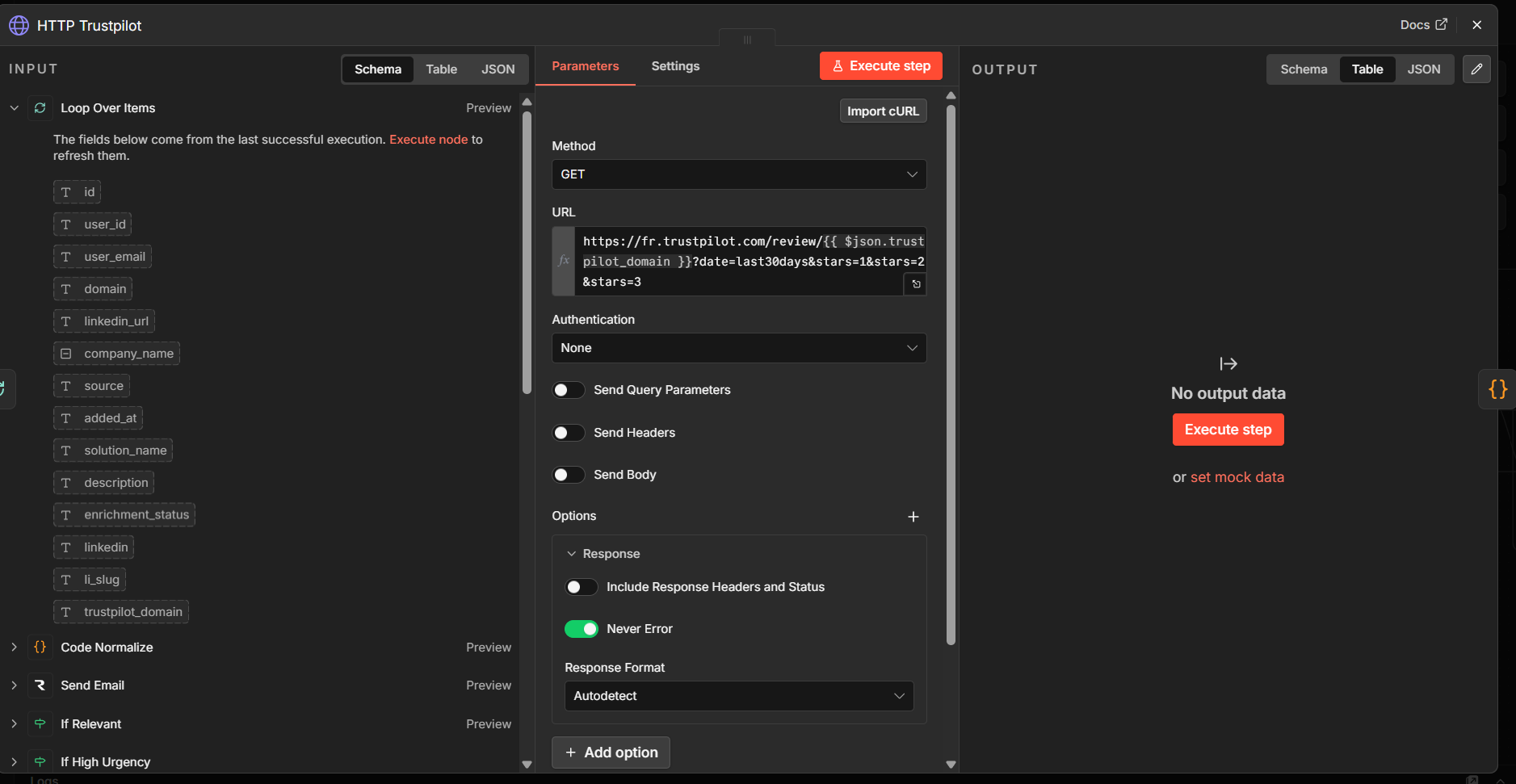
For the web and Trustpilot, I use n8n's HTTP nodes directly, with manual HTML parsing. No Playwright here, most of the pages I care about (blog, product pages, Trustpilot) are static enough that server-side HTML rendering is workable.
For cases where JavaScript rendering is needed, I put in place a fallback similar to what I built in the Scrapy technology detection project: try without rendering first, enable full rendering only if the page appears empty.
Step-by-Step Build
1. The list of competitors to monitor
The starting point is a Supabase table that contains the companies to monitor for each client. It stores the company name, its web domain, its Trustpilot URL, and its LinkedIn page URL.
Upstream normalization matters. A poorly formatted domain (with or without www, with or without https) breaks downstream HTTP calls. I added a dedicated cleaning node that standardizes all identifiers before entering the loop.
Simple principle
Better to reject a malformed entry at the loop input than to debug an HTTP error at node 35.
2. Trustpilot — the ground-level source
This is the source that surprised me the most. Negative reviews are a goldmine of commercial intelligence when you know how to read them.
A 1 or 2-star review about a competitor's customer support, repeated over several weeks, is a concrete signal. It's not analysis, it's what customers are saying publicly.
Example of a signal extracted after parsing and cleaning:
{
  "source": "trustpilot",
  "rating": 2,
  "topic": "support_client",
  "raw_review": "Le support ne répond jamais en moins de 5 jours. On a perdu des données à cause d'un bug non corrigé depuis des semaines.",
  "signal_detected": "frustration récurrente sur la qualité du support et la réactivité"
}
Difficulties encountered:
- Trustpilot's HTML structure sometimes changes without warning;
- some competitors have very few reviews (fewer than 10), making the analysis unreliable;
- reviews can be very emotional and hard to classify without context.
3. LinkedIn — filter before analyzing
On LinkedIn, I quickly realized that the majority of posts don't deserve to be analyzed. Before even calling the LLM, I apply a basic filter on post content.
Categories I systematically discard:
- internal congratulation posts ("Welcome [Name] to the team");
- generic employer branding posts;
- article shares with no added content;
- event posts with no product information.
Categories I keep:
- product or feature launch announcements;
- targeted hiring (engineers, salespeople in a specific segment);
- announced partnerships or integrations;
- leadership or structural changes;
- commentary on sector-specific topics.
flowchart LR
    A[LinkedIn post] --> B{Pre-analysis\nfilter}
    B -->|Noise| C[Discarded]
    B -->|Potential signal| D[AI analysis]
    D --> E{Actionable\nsignal?}
    E -->|No| F[Ignored]
    E -->|Yes| G[Stored\nSupabase]
4. Website — the most heterogeneous source
This is technically the most complex source. Every site has its own structure. I defined a list of standard paths to test when looking for editorial content:
CONTENT_PATHS = [
    "/blog",
    "/actualites",
    "/news",
    "/ressources",
    "/articles",
    "/cas-clients",
    "/insights",
    "/changelog"
]
For each competitor, the pipeline tests these paths in order until it finds a page with readable content. If none of them return something usable, the competitor is marked as "no web source detected" for that cycle.
What took me the most time
Many sites load their articles entirely in JavaScript. The HTML returned server-side contains almost nothing. I had to handle these cases separately with a Playwright fallback, which significantly slows down this branch of the pipeline.
5. Cleaning and normalization
This is the part of the pipeline that takes the most time to do well, and the one you tend to rush because it's thankless work.
The real work wasn't the AI
The real work was making the data clean enough for the AI analysis to be useful. A model that receives raw HTML with navigation menus, footers, scripts, and ads as input produces unusable output.
Cleaning operations applied systematically:
- removal of residual HTML tags;
- stripping of scripts, styles, comments;
- deduplication of identical lines;
- truncation beyond a token threshold (to avoid context overflow);
- encoding normalization;
- removal of navigation blocks, footers, and sidebars detected by pattern.
6. Assembling context for the AI
Before calling the model, I assemble a structured context that clearly separates sources and adds the client profile.
You are analyzing multi-source competitive intelligence.

Company being monitored: {{company_name}}
Sector: {{sector}}

--- TRUSTPILOT SOURCE ---
{{trustpilot_summary}}

--- LINKEDIN SOURCE ---
{{linkedin_summary}}

--- WEBSITE SOURCE ---
{{website_summary}}

--- CLIENT CONTEXT (Signar) ---
{{client_profile}}

Objective: identify only signals that are genuinely actionable from a commercial standpoint.
Do not retain generic or non-actionable information.

Return strict JSON with for each signal:
{
  "signal_type": "customer_pain | product_move | hiring_signal | strategic_shift | pricing_change",
  "source": "trustpilot | linkedin | website",
  "severity": 0.0 to 1.0,
  "confidence": 0.0 to 1.0,
  "commercial_angle": "concrete angle for commercial use",
  "recommended_action": "recommended action, specific and actionable"
}
Structuring the sources in separate blocks significantly improves the quality of the analysis. The model makes fewer confusions between what comes from Trustpilot and what comes from the website.
7. Deduplication by hash
Without this mechanism, the same signal comes back every week. A negative Trustpilot review from three months ago will keep showing up in results on every crawl if you don't deduplicate.
The strategy is simple: generate a hash from the stable elements of the signal.
const crypto = require('crypto');

const base = [
  item.companyDomain,
  item.source,
  item.signalType,
  item.rawContent.slice(0, 200)
].join(':');

const hash = crypto.createHash('sha256').update(base).digest('hex');

return { ...item, hash };
Before inserting to the database, the pipeline checks whether this hash already exists in Supabase. If it does, the signal is ignored. If not, it's inserted with the date of first detection.
8. Prioritization and output
Once signals are stored, a final node calculates an urgency level based on the combination of severity × confidence and signal freshness.
flowchart LR
    A[Stored signal] --> B[Urgency score\nseverity × confidence]
    B --> C{Threshold\n> 0.6?}
    C -->|Yes| D[High urgency\nnotification]
    C -->|No| E[Normal queue\nweekly review]
High-urgency signals can trigger a Teams or Slack notification so the sales team is alerted without waiting for the weekly review.
What I Broke (and What It Taught Me)
Trusting AI too much first
My first version sent the raw HTML from pages directly to the model and asked it to "find the interesting signals." The result was unpredictable, expensive in tokens, and often useless.
The fix was to stop thinking of AI as a magic wand, and instead treat it as a final processing layer that's only useful if all the upstream work is done cleanly.
The LinkedIn noise
I underestimated how much useless content there is on LinkedIn. Out of 100 posts retrieved for a company, I'd sometimes keep only 3 or 4 after filtering. The rest: HR content, events, generic posts.
The solution was to add a pre-AI filter that discards posts by title and content pattern before even calling the model. It reduces costs and speeds up processing.
Heterogeneous websites
Some sites have no blog. Others have a blog without dates. Others publish everything in JavaScript. I ran into cases where the pipeline was picking up navigation menus as the main content because the articles page returned nothing usable.
Real example
One competitor had a /blog page that returned only a JavaScript shell. The content I parsed: "Loading... Please enable JavaScript." And the model dutifully analyzed that sentence as editorial content.
The n8n workflow that grows fast
After a few weeks of iteration, the main workflow had over 60 nodes. Navigating it became difficult. Debugging an error on the LinkedIn branch without affecting the Trustpilot branch became a delicate exercise.
The solution was to split into sub-workflows: one main workflow for orchestration and the loop, and one sub-workflow per source (Trustpilot, LinkedIn, web). Each sub-workflow is independently testable.
What Worked
Cross-referencing sources
This is the real value of the system. A single source produces noise. Multiple aligned sources produce context.
A concrete example observed:
- Trustpilot: accumulation of complaints about support response time over the last 30 days
- LinkedIn: open positions for Customer Success and Support roles
- Website: recent publication of an article "How we're improving our customer support"
Taken separately, each signal is anecdotal. Together, they clearly paint a picture of a company under operational strain trying to recover from a degraded situation.
That's exactly the kind of commercial angle worth passing to a salesperson.
Structured output
Forcing strict JSON output changes everything. Instead of receiving free-form text that someone has to re-read and interpret, you get directly:
Example structured signal
{
  "company": "ExampleCorp",
  "signal_type": "customer_pain",
  "source": "trustpilot",
  "severity": 0.78,
  "confidence": 0.71,
  "commercial_angle": "Highlight support quality and guaranteed response time. This competitor is clearly struggling on this point for several weeks.",
  "recommended_action": "Create a sales alert for accounts in the same segment. Prepare a demo angle centered on support."
}
This format is directly usable in an app, in a CRM, or in a weekly summary email.
Repeated signals
The best signals aren't the most spectacular. They're often the most repetitive.
One isolated negative review about support: not very actionable. The same type of complaint coming back 8 times in 3 weeks: that's a pattern. The pipeline detects and aggregates these repetitions rather than treating them as independent signals.
What I Learned
- Cleaning matters more than the model. The quality of the analysis is proportional to the quality of the prepared context. Not the other way around.
- Modularize early. A 60-node workflow with no structure becomes unmanageable. A 15-node workflow that calls 3 sub-workflows of 15 nodes each stays readable.
- Log systematically. Every signal must trace its source, its detection date, and the prompt version used. Without that, errors are very hard to reproduce.
- Deduplication is non-negotiable. Without hashing, the database fills up with duplicates within weeks.
- Intelligence only has value if it helps people decide. A news feed isn't enough. You need filtered, scored, and contextualized signals with an explicit commercial angle.
- A salesperson doesn't want to "read data." They want to know why to act now, and what to say concretely.
- Fewer signals is better. I had versions that surfaced 40 signals per week per company. Result: nobody read them. Filtering down to the 3-5 genuinely useful signals changes adoption.
- n8n is excellent for iterating. Less so for maintaining a complex production system long-term.
- An imperfect but observable system beats an ambitious opaque one. Being able to see where an error occurred, replay a node, and track signal volume week over week is more useful than having a "perfect" pipeline that's impossible to debug.
Current Limitations
What remains fragile
- Scoring still heuristic. The
severityandconfidencethresholds are manually calibrated. They work, but they're not learned from historical data. - LinkedIn dependent on Apify. If the Apify actor I use breaks, that source goes down. It's an uncontrolled external dependency.
- Trustpilot sometimes incomplete. Competitors with few reviews (< 10) produce nothing usable. The pipeline detects this and moves on, but coverage isn't universal.
- No trend history. Right now, I see current signals. Not how they evolve over time.
- No human validation. First results are sent as-is. There's no feedback loop that would let me improve filtering based on which signals actually get used.
What I'd Do Differently
What I had:
What I'd do:
Define the signal schema upfront, before writing the first prompt.
Create a fixed test set with companies whose signals I already know. Use these examples to validate every change to the pipeline.
Observed Signal Distribution
pie title Indicative breakdown of actionable signals by source
    "Trustpilot" : 42
    "Website / blog" : 35
    "LinkedIn" : 23
quadrantChart
title Intelligence sources — Utility vs. Noise
x-axis Low noise --> High noise
y-axis Low utility --> High utility
quadrant-1 Useful but noisy
quadrant-2 Highly actionable
quadrant-3 Low priority
quadrant-4 Needs heavy filtering
Trustpilot: [0.35, 0.85]
Site web: [0.48, 0.70]
LinkedIn: [0.78, 0.55]Conclusion
This project confirmed something I knew in theory but needed to experience in practice: public data is abundant. The value comes from the sorting.
AI is useful in this pipeline, but at the end, after the real work. It classifies, summarizes, contextualizes. It doesn't replace collection, cleaning, and structuring.
What interests me in this type of system isn't replacing human analysis. It's surfacing faster the handful of signals that genuinely deserve a human's attention.
What I want to explore next
- Trend detection over time (Trustpilot score evolution over 3 months)
- Signal clustering by type and sector
- Lightweight human validation with a feedback loop
- Conditional alerts based on signal combinations
- Structured weekly export to CRM